
Ensure that outlook is shutdown
Step 1 – Please navigate to the Mail icon in the Control panel as below. To find Control Panel, click Start ->Control Panel.

Step 2 – In Control Panel, navigate to User Accounts and Family Safety, and then select Mail as below.
Step 3 - from the Mail Setup window select Show Profiles.
NOTE: If your computer does not have any Outlook profiles already set up, you will not see the Mail Setup window and can skip to step 4.
Step 4 - Select the Add button near the middle of the Mail window.
Step 5 - Type your desired Profile Name in the New Profile window.
NOTE: If more than one account is set up on the computer, Outlook will prompt you to select the account you’d like to log in to from the list of Profile Names.

Enter your details provided if you dont have these details please contact support , support@itcentre.com.au or 1300 721 486
Leave the Email Account button Highlighted
Enter your details as provided. then click next
if the automatic function does not work please contact support
Once created please highlight the newly created profile as default as below.
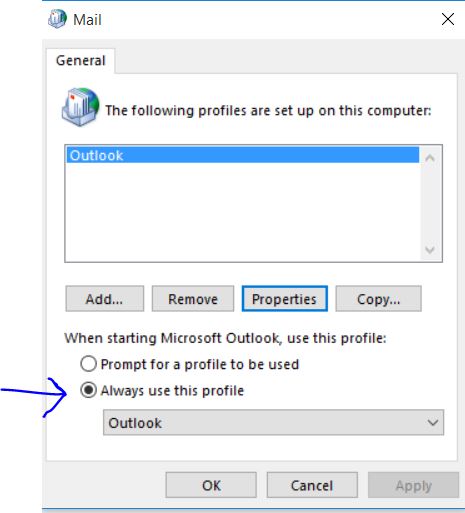
then you should be good to go.
Thanks itsupport